- Download the latest version from http://www.bitstreamtools.com/download
- Unpack the archive to a folder on your hard drive
- Ensure your Licence File is in the same folder as the main executable
- Ensure you have a working DirectShow configuration to allow Video Preview.
We recommend using the latest Haali Splitter and FFDShow freeware codecs for accurate Video Preview
Full Licence Activation:
- Ensure TSPE is running on the PC you want to use TSPE to generate the correct hardware licence
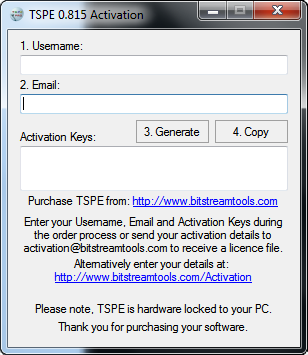
- Click on Help - Activate
- Type in your Username and Email address
- Click on the Generate Button
- Purchase TSPE by following the Buy Now link from the Download page
- Fill in your Username, Email and the two activation key strings in the purchase page or send them to [email protected] after purchasing to receive your full licence file
- Once you have received your full licence file, overwrite your evaluation licence with your full licence
- TSPE is hardware locked to your PC, please contact us if you need to move your licence to another machine or change your PC